Agent vs Custom Agent vs Skills in Copilot VS Code (Complete Guide 2026)
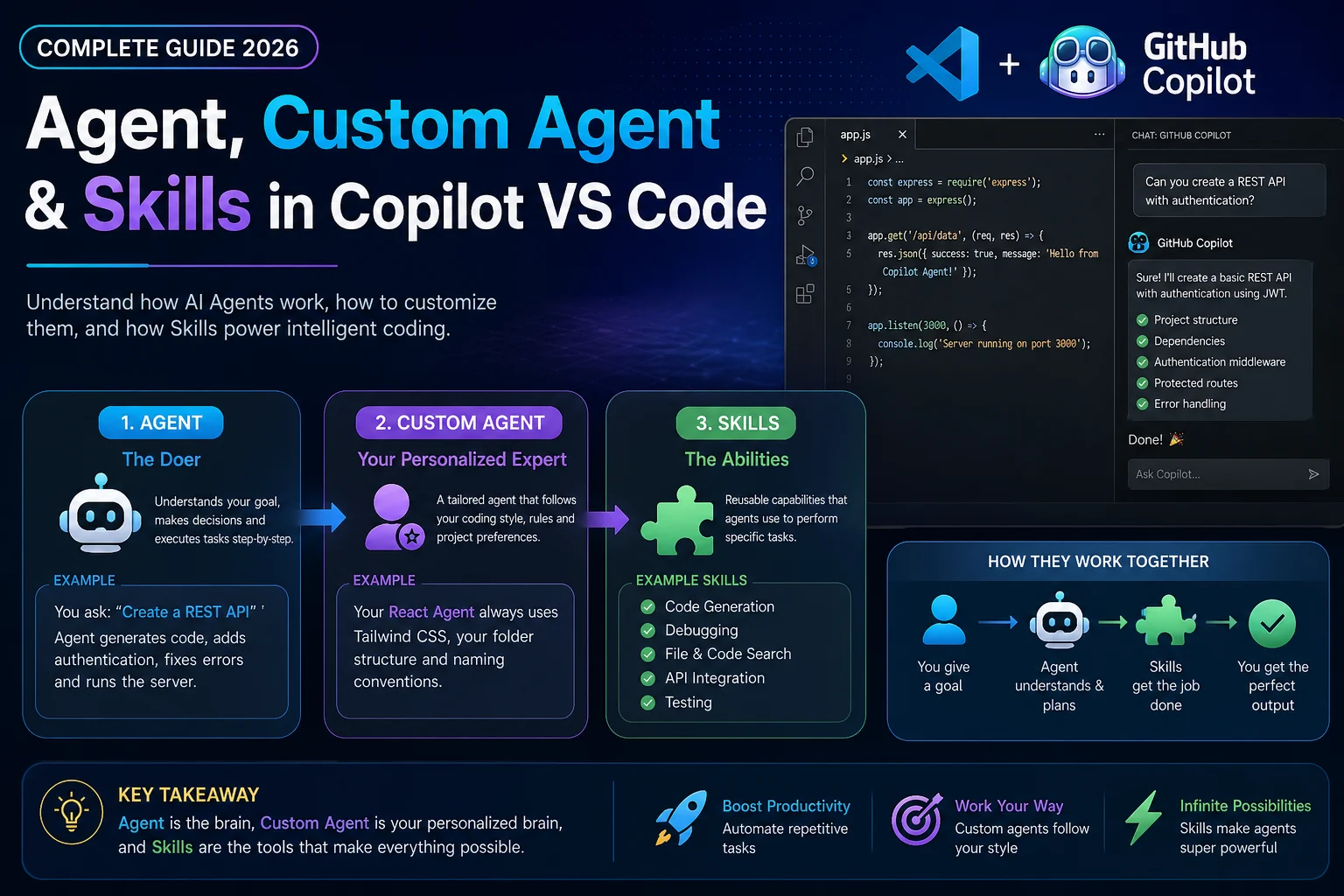
Artificial intelligence developer tooling has matured beyond simple inline code completion. In modern development workflows—particularly within VS Code—GitHub Copilot has transformed from a predictive autocomplete engine into an autonomous software engineering assistant.
Three distinct concepts now dominate GitHub Copilot's architecture: Agents, Custom Agents, and Agent Skills. Understanding how each functions, where they differ, and how they interact allows developers to automate complex tasks, build customized local workflows, and significantly accelerate software delivery.
📘 Table of Contents
- Executive Summary & Comparison Table
- What is an Agent in GitHub Copilot?
- What is a Custom Agent?
- What are Agent Skills?
- The Hierarchy: How Agents and Skills Work Together
- Practical Examples & Configuration Walkthrough
- When to Use Which: Architectural Decision Matrix
- Frequently Asked Questions (FAQ)
⚡ Executive Summary & Comparison Table
| Feature | Built-in Agent (@workspace, @terminal) | Custom Agent | Agent Skills |
|---|---|---|---|
| Scope | Global workspace context or terminal environment | Domain-specific project guidelines and targeted workflows | Granular, reusable tool execution (APIs, CLI scripts, linters) |
| Creation | Pre-packaged by GitHub & Microsoft | Defined by developers via markdown instructions and configs | Packaged reusable instruction and script bundles |
| Execution | Built-in reasoning engine | Governed by custom rules and specialized context | Invoked dynamically on-demand when a matching intent is detected |
| Best For | Broad codebase search, test scaffolding, terminal commands | Organization coding standards, architecture enforcement | Running specialized scripts, checking lint errors, interacting with external systems |
🤖 1. What is an Agent in GitHub Copilot?
In GitHub Copilot, an Agent is a specialized persona equipped with autonomous reasoning, tool access, and dedicated context. When you interact with Copilot Chat, using an @ prefix directs your prompt to a specific agent:
@workspace: Possesses semantic knowledge of your entire repository. It analyzes symbol indexes, directory structures, dependencies, and file relationships to answer cross-cutting questions like "Where is user authentication handled?" or "Generate an end-to-end test for checkout."@terminal: Understands shell semantics, active command-line environments (Bash, Zsh, PowerShell), CLI errors, and system processes. It can explain cryptic stderr messages or generate complex shell one-liners.@vscode: Interacts directly with the VS Code IDE API—modifying settings, finding keybindings, or opening tabs.
Agents do not merely return text; they iteratively execute internal tool loops: collecting context, executing searches, and synthesizing multi-file patches.
🛠️ 2. What is a Custom Agent?
While built-in agents provide generalized assistance, enterprise software projects require organization-specific context: specific architectural patterns, internal design tokens, regulatory compliance guidelines, and domain idioms.
A Custom Agent allows teams to define specialized AI personas tailored to their project's exact requirements. By defining markdown-based prompt configurations (often stored within .github/copilot-instructions.md or specialized agent configuration manifests), teams create custom agents with strict operational boundaries:
- Architectural Enforcers: Ensuring every new service adheres to Clean Architecture or Hexagonal Design.
- Security & Compliance Checkers: Rejecting queries that introduce unvetted libraries or non-compliant cryptography.
- Domain Specialists: Contextualized on proprietary internal SDKs and domain-driven design entities.
🧩 3. What are Agent Skills?
An Agent Skill represents a discrete, reusable capability or procedural tool that an agent can invoke during execution. While an agent provides the reasoning engine, skills provide the hands and eyes.
A skill typically bundles:
- Trigger Criteria: Metadata defining when the skill should be activated (e.g., regex pattern, keyword, or task classification).
- Procedural Instructions: Step-by-step guidance on how to carry out the operation safely.
- Executable Helpers: Shell scripts, API requests, or local binaries that the agent can invoke to inspect the environment or manipulate state.
🔄 4. How Agents and Skills Interact
Consider a developer asking: "Run our unit test suite and fix any failing tests in the auth package."
- Agent Invocation: The prompt targets the custom project agent.
- Context Discovery: The agent inspects the repository layout and recognizes auth unit tests.
- Skill Activation: The agent discovers a registered skill:
test-runner-skill. - Execution & Feedback: The skill executes the local test runner (
npm test), captures stderr traces, and feeds the raw failure output back to the agent. - Code Repair: The agent evaluates the failure, locates the relevant lines in
auth.service.ts, generates the fix, and re-executes the skill to confirm all tests pass.
💡 Best Practices for Developer Teams
- Avoid Overly Broad Prompts: Give custom agents focused, unambiguous instructions.
- Version-Control Skills: Commit skill definitions directly to Git so all team members and CI pipelines maintain consistent capabilities.
- Audit Generated Code Locally: Utilize client-side tools like Toolaska Code Differ to review diffs before staging commits.
❓ Frequently Asked Questions (FAQ)
Can I create custom agents without GitHub Copilot Enterprise?
Basic workspace instructions (.github/copilot-instructions.md) are supported across Copilot Pro, Business, and Enterprise plans. Advanced skill routing and enterprise directory integration may require organizational tiers.
Are my repository files uploaded when using custom agents?
When using local client-side developer utilities (like Toolaska), your code never leaves your computer. For cloud-hosted Copilot sessions, enterprise privacy controls govern indexing and telemetry.